Computer Vision Syndrome - Digital Eye Strain

Digital eye strain, also known as Computer Vision Syndrome (CVS), occurs from prolonged screen use on computers, tablets, or smartphones. Causes include poor lighting, glare, incorrect viewing distances, and vision problems. 

Symptoms include eye fatigue, headaches, blurry vision, dry eyes, and neck pain. Although not serious, they can cause discomfort and reduce productivity. It can be prevented by adjusting contrast and brightness levels, maintaining correct posture, using anti-glare screens, and following the 20-20-20 rule. Regular eye exams make early detection easier.

Computer Vision Syndrome Causes

Computer Vision Syndrome has become a highly common issue in the modern world. Some key causes include:

  • Extended Screen Time: Prolonged periods spent staring at digital screens force your eyes to focus and refocus constantly, leading to digital eye strain.
  • Poor Lighting: Low lighting in the workspace or glare from the screen can contribute to eye discomfort and strain. This is also one of the reasons for digital eye strain.
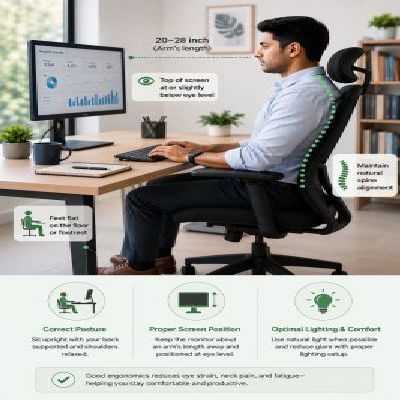
  • Poor Ergonomics: Incorrect distance from the screen can lead to poor posture and cause additional strain on your eyes.
  • Uncorrected Vision Problems: If you have undiagnosed or uncorrected vision issues like farsightedness, nearsightedness, or astigmatism, you may experience more severe symptoms of CVS.
  • Lack of Blinking: When concentrating on a screen, people tend to blink less, leading to dry eyes, which exacerbates discomfort and strain.

Symptoms of Computer Vision Syndrome (Digital Eye Strain)

The symptoms of Computer Vision Syndrome vary from person to person. However, common symptoms are:

  • Digital Eye Strain: A constant feeling of discomfort or tiredness in the eyes after prolonged screen time.
  • Headaches: Frequent or persistent headaches, especially after long periods of focusing on digital devices.
  • Blurred Vision: Difficulty seeing objects clearly, both on and off-screen.
  • Dry Eyes: A lack of sufficient moisture in the eyes due to reduced blinking, leading to irritation or a gritty sensation.
  • Neck and Shoulder Pain: Poor posture and improper screen positioning can cause strain in the neck, shoulders, and back.

Diagnosis of CVS

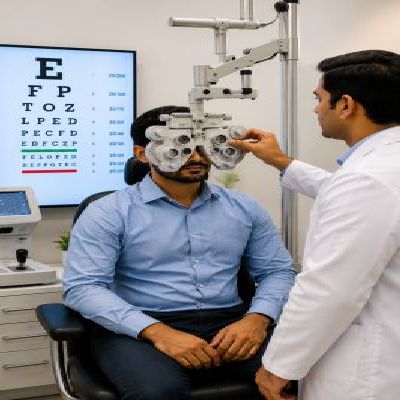
Diagnosis of Computer Vision Syndrome typically involves a comprehensive eye examination performed by an eye care professional. This exam may include tests to assess visual acuity and the ability to focus and may involve specific questions about screen usage habits. An evaluation of the patient’s work environment and posture can also help diagnose CVS. By understanding your digital device usage patterns and checking for any underlying vision issues, a doctor can accurately diagnose CVS and provide appropriate recommendations for treatment.

Computer Vision Syndrome diagnosis is done through the following steps:

  1. Exhaustive eye examination and focusing tests
  2. Review of screen habits and posture
  3. Detection of existing eye or vision problems
  4. Diagnosis and tailored treatment plan

Have you been delaying an eye exam for quite some time?

Treatment of Computer Vision Syndrome

Treatment of computer vision syndrome usually requires a multi-faceted approach to alleviate symptoms and prevent further eye strain. Here are some effective treatment methods:

  • Increase font size and contrast  – Helps to reduce eye strain
  • Use updated prescriptions – Make sure to wear the right glasses or contacts
  • Blink often – Helps to reduce dry eyes from screen use
  • Schedule regular eye tests – Detect and correct vision promptly

How to Prevent Computer Vision Syndrome?

Children are particularly vulnerable to Computer Vision Syndrome due to their increasing screen time for educational and entertainment purposes. The symptoms can be similar to those in adults, but children may not always communicate their discomfort. Parents should monitor their child’s screen habits and watch for signs like frequent eye rubbing, squinting, or headaches. Follow these eye care tips to reduce the effects of computer vision syndrome.

1. In Children 
  • Limit screen time and usage
  • Ensure the lighting is adequate
  • Promote outdoor play and activities
  • Have proper posture while using screens
  • Set the screen at a safe distance from the eye and below eye level
 2. In Youth 
  • Follow the 20-20-20 rule to reduce constant strain
  • Set the screen at a safe distance from the eye and below eye level
  • Adopt comfortable ergonomic settings while using screens
  • Use filters or anti-reflective screens
  • Blink frequently and keep the eyes hydrated

Eye Exercises to Relieve Digital Eye Strain

Incorporating simple eye exercises into your daily routine can help alleviate digital eye strain. These exercises are easy to perform and can be done in just a few minutes:

  • Blinking Exercise: Blink deliberately every few seconds to rehydrate your eyes and reduce dryness. Blinking frequently helps restore the moisture balance in the eyes.
  • Focus Change Exercise: Stretch your hand so the thumb is about 10 inches away from your face. Now, focus on it. Next, shift the focus to an object that is 20 feet away. Repeat this back-and-forth exercise 10-15 times. This will increase your eye focus over time.


  • Eye Rolling Exercise: Close your eyes and roll them slowly in a circular motion. If you do this for 10 seconds, it will relax the eye muscles and relieve strain.
  • Palming Exercise: Rub your palms for warmth and gently place your palms over closed eyes. Hold this position for 30 seconds to a minute to give your eyes a relaxing break.

Performing these exercises regularly, especially during long periods of screen use, can reduce digital eye strain and improve overall eye health.

By following these suggestions, you can take control of your eye health and reduce the impact of Computer Vision Syndrome on your daily life.

Why Choose Centre for Sight for Digital Eye Strain Treatment?

Choosing Centre for Sight for Digital Eye Strain treatment means trusting experienced eye care professionals who will prioritise your eye care using advanced technology. We offer thorough evaluations, education, customized solutions, and ongoing support to keep your eyes healthy.  

With Centre for Sight, you’re in trustworthy, caring hands dedicated to helping you see clearly and improving your quality of life.

Struggling with Computer Vision Syndrome?

Frequently Asked Questions

How Do You Treat Eye Strain Due to the Computer?

Take regular breaks, adjust screen settings for optimal viewing, ensure proper lighting, practice the 20-20-20 rule (every 20 minutes, look at something 20 feet away for 20 seconds), use computer glasses, and maintain good posture. Also, get your eye power checked regularly, and wear glasses if prescribed.

Computer Vision Syndrome (CVS) refers to vision-related problems caused by prolonged computer, tablet, or smartphone use, often due to factors like poor lighting, screen glare, and improper viewing distances.

The common symptoms of Computer Vision Syndrome are the problems caused by prolonged computer usage, such as:

  • Eye irritation (Dry eyes, itchy eyes, red eyes)
  • Blurred vision
  • Headaches
  • Backaches
  • Neck aches
  • Eye fatigue

Yes, children are susceptible to Computer Vision Syndrome as using digital devices, such as computers, tablets, and smartphones for a long period, can lead to eye strain and fatigue in children, just as in adults. It’s important to aware children as well as parents about it.

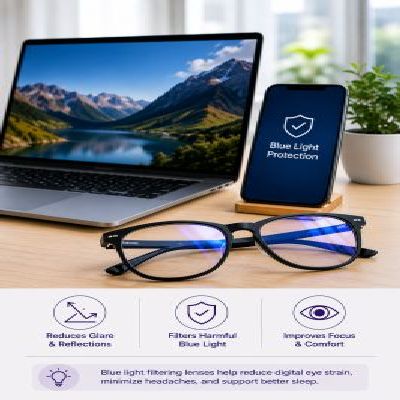
Yes, blue light from screens is a factor in Computer Vision Syndrome as it develops eye strain and fatigue. Using filters or reduced screen time helps mitigate its impact.

It is generally recommended to have eye exams every year to examine Computer Vision Syndrome, especially if you spend an ample amount of time. However, if you face any trouble, consult an eye expert as soon as possible.

Yes, anti-reflective coatings and blue light filter glasses are available to reduce eye strain and prevent Computer Vision Syndrome. These glasses can provide more comfort while using digital devices for extended periods.

Proper lighting plays a vital role in preventing Computer Vision Syndrome as it provides sufficient, glare-free lighting, illuminates work areas, reducing eye strain during prolonged computer use.

Yes, Computer Vision Syndrome is linked to dry eyes. Extended screen period can reduce blinking and lead to dryness. Taking breaks, using artificial tears, and following the 20-20-20 rule can help alleviate symptoms.

Computer vision syndrome symptoms can be effectively managed by following the 20-20-20 rule (take a 20-second break every 20 minutes), adjusting screen brightness, maintaining good posture, and using lubricating eye drops.

The duration for Computer Vision Syndrome symptoms to dissipate varies depending on individual factors and the severity of the symptoms.

Computer Vision Syndrome (CVS) can’t be “cured” but its symptoms can be managed effectively with lifestyle changes and adjustments.

Several factors cause digital eye strain, such as:

  • Less eye blink

  • Screen glare

  • Poor lighting

  • Poor posture while using a computer

  • Using computer from a wrong distance and angle

  • Uncorrected vision problems

  • A combination of many of these factors

The 20-20-20 rule in the context of Computer Vision Syndrome is defined as a 20-second break to look at something 20-feet away every 20-minutes of screen time. It is considered as one of the effective ways to prevent Computer Vision Syndrome and reduce prolonged screen time.

Prolonged screen time can lead to eye strain, fatigue, and discomfort, but there is no evidence that Computer Vision Syndrome can cause permanent damage to eyes.

Yes, pre-existing eye problems can worsen Computer Vision Syndrome. Managing existing conditions through regular eye check-ups is crucial for reducing eye strain while using digital devices.

Prolonged use of digital devices may contribute to eyestrain, headaches, and migraines. Adjusting screen settings, taking breaks, and using proper eyewear can help eliminate symptoms and reduce the likelihood of developing Computer Vision Syndrome.

Yes, Computer Vision Syndrome can affect sleep patterns. Prolonged screen time, especially before bedtime, can interfere with melatonin production due to increased exposure to blue light and thus disturb the sleep patterns.

Not necessarily, adjusting your workspace lighting and anti-glare screens can prevent further strain.

Eye Exercises to Relieve Digital Eye Strain

Computer Vision Syndrome